TL;DR
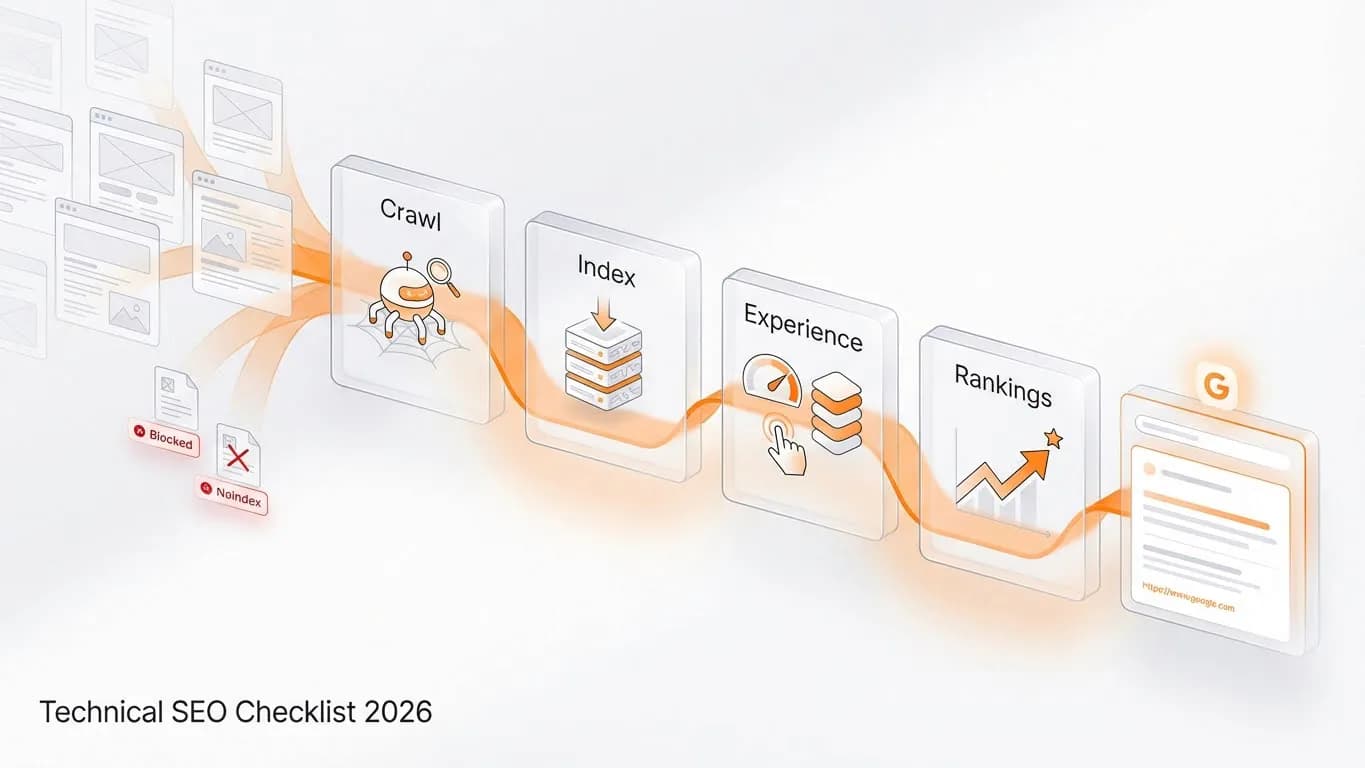
A technical SEO checklist ensures search engines can crawl, render, and index your site while keeping pages fast and stable for users. This guide covers the essentials: crawlability, indexing, Core Web Vitals, mobile readiness, security, and structured data. Run a technical SEO audit at least quarterly to catch issues before they affect rankings.
Core checks:
- HTTPS enabled with no mixed content
- Clean architecture with key pages within three clicks of homepage
- Robots.txt not blocking important resources
- XML sitemap submitted to Google Search Console
- Core Web Vitals passing (LCP under 2.5s, INP under 200ms, CLS under 0.1)
- Mobile usability verified
- Structured data validated
- Internal links connecting content without orphaned pages
Why Technical SEO Still Decides Who Ranks
Here's something we see all the time: a site with genuinely useful content, solid backlinks, and a team that's done everything "right", but rankings that won't budge. Nine times out of ten, the culprit is technical.
Technical SEO covers everything helping search engines crawl, render, and index your content. Site speed, structured data, mobile readiness, security, architecture—it's the foundation underneath your content strategy. Without it, even brilliant content struggles to get visibility. You can write the best article on the internet, but if Googlebot can't reach it or your page takes eight seconds to load, that content isn't ranking.
Google's documentation still emphasizes Core Web Vitals as page experience signals. Sites passing these thresholds tend to see higher engagement and more stable rankings because they deliver what users expect. The business impact is immediate: research shows a one-second delay can reduce conversions by up to 7%, and more than half of mobile users abandon pages taking longer than three seconds. That's not just a ranking problem, it's revenue walking out the door right now.
This technical SEO checklist focuses on three priorities: crawlability, indexing, and Core Web Vitals. We'll also cover the technical foundations that support them. The goal is practical: a repeatable framework you can use quarterly as algorithms evolve and your content grows.
What Is a Technical SEO Checklist (and How to Use It)
A technical SEO checklist is a structured set of tests and fixes ensuring search engines can crawl, render, and index your site while users get fast, stable pages. Think of it as quality control for your site's infrastructure.
Modern checklists cover crawlability (robots.txt, sitemaps, internal links), indexability (meta directives, canonicals), performance (Core Web Vitals), mobile readiness, security, and structured data. Most guides organize these into phases—crawlability first, then performance, then everything else to prevent missing critical issues.
Start with a full crawl and audit of where things stand. Prioritize issues blocking crawling or indexing, or breaking Core Web Vitals. Fix those before UX refinements. The foundation has to be solid first.
Most SEO teams run comprehensive audits quarterly, with monthly checks on Core Web Vitals, coverage errors, and crawl stats. Treat this as a recurring process, not a one-time project. Algorithm updates and site changes continuously introduce new issues.
Crawlability: Can Google Reach Your Important Pages?
Crawlability is Googlebot's ability to discover and move through your URLs without dead ends or blocks. Most audits start here because if Google can't reach your pages, nothing else matters.
Robots.txt
Your robots.txt tells crawlers which areas they can access. Common mistakes include blocking all bots with overly broad rules, or blocking directories with important content or rendering resources. We've seen sites lose rankings for months because someone added "Disallow: /" during staging and forgot to remove it.
Review robots.txt after every major site change. Use Search Console's tester to verify your rules work. A misconfigured file can quietly block key pages without any alert.
XML sitemaps
Your sitemap acts as a map of canonical URLs, telling Google which pages matter most. Submit clean, current sitemaps through Search Console and keep them focused. Exclude noindex pages and parameter variations so Google allocates crawl resources to priority content.
Internal linking and architecture
Flat architecture keeps important pages within three clicks of your homepage, helping Googlebot discover content quickly and signaling which pages matter through link equity flow.
Orphaned pages (URLs with no internal links) often remain uncrawled or undervalued. We regularly find these during audits: pages published, never linked, essentially invisible to both users and search engines. If a page is worth having, it's worth linking to from somewhere relevant on your site.
How do I check if Google is crawling my site? Use Search Console's crawl stats for frequency and response codes, URL Inspection for specific pages, and server logs for the complete picture of when Googlebot visited and what it requested.
Indexing: Why Pages Are Indexed but Not Ranking
A page being indexable and being indexed are different things. Indexable means directives allow it in search results. Indexed means Google added it. Both can be true while the page still doesn't rank, and that's where real troubleshooting begins.
Meta directives
Noindex tags control whether pages appear in results. Accidental noindex on valuable pages is one of the most common audit findings. It usually happens when developers add noindex during staging, then deploy to production without checking.
Filter your crawl data for noindex URLs and cross-reference with Search Console coverage. Pages showing "Excluded by noindex tag" should be only intentional.
Canonicals and duplicates
Canonical tags consolidate ranking signals when you have duplicate URLs, common with product variations, filters, or tracking parameters. They tell Google which version to prioritize.
Problems arise when canonicals conflict. If page A points to B as canonical, but B points back to A, Google guesses your intent. We've seen this create ranking instability for months while the site sends mixed signals. Similarly, many URLs pointing to non-preferred versions dilutes authority you're trying to consolidate. Check your implementation carefully, especially after migrations.
Thin content
Large numbers of thin pages (minimal unique content) can drag down overall quality. Audit for pages with low word counts, high bounce rates, and minimal traffic. Consolidate similar thin pages into comprehensive resources, or remove pages serving no purpose.
Why are my pages indexed but not ranking? Content might not match search intent. Internal links might not direct enough authority to the page. Multiple pages might compete for the same keywords. External links might be insufficient. Technical issues such as canonicals and weak internal linking can also contribute even when content is solid.
Core Web Vitals and Performance: LCP, INP, CLS
Core Web Vitals measure user experience across loading, interactivity, and stability. Google evaluates these at the 75th percentile of page loads, your typical experience matters more than your best case.
Metric | Good Threshold | What It Measures |
|---|---|---|
LCP | Under 2.5 seconds | Main content loading |
INP | Under 200 milliseconds | Response to user input |
CLS | Under 0.1 | Layout stability |
According to industry research, 53% of mobile visitors abandon pages taking over three seconds. Every millisecond you shave off is revenue you're not leaving on the table.
Where to check
Search Console's Core Web Vitals report shows real user performance. PageSpeed Insights and Lighthouse provide lab diagnostics for debugging specific issues.
Optimization priorities
For LCP:
Compress and properly size images using WebP or AVIF. Minimize render-blocking CSS/JS. Defer non-critical scripts. Use a CDN. If your LCP element is an image, don't lazy-load it—hero images need to load immediately.
For INP:
Reduce JavaScript bundle sizes. Break up long tasks blocking the main thread. If clicking feels sluggish, users notice.
For CLS:
Reserve space for ads, embeds, and images by specifying dimensions. Avoid inserting content above existing elements after load. That annoying experience where the page shifts as you're about to tap something? That's CLS killing trust.
What Core Web Vitals matter most?
All three contribute to Google's page experience assessment. Miss any of them and you're leaving ranking potential on the table, plus frustrating the users who do stick around.
Technical Foundations: Mobile, Security, and Structured Data
These elements support your crawlability, indexing, and performance efforts. Get them wrong and you'll undermine everything else.
Mobile-first indexing
Google primarily uses your mobile version for indexing. Use responsive design, keep content identical across devices, and ensure tap targets and font sizes meet usability standards. If you hide content on mobile that exists on desktop, Google might not index it. What Google can't see on mobile, Google can't rank.
HTTPS
A baseline expectation now. Browsers warn users about insecure sites with alarming messages that tank trust immediately. Check for mixed content, HTTP resources on HTTPS pages—which can trigger warnings or block resources entirely. Run your site through a mixed content checker periodically.
URL consistency
Your site should resolve to exactly one version of each URL. Choose www or non-www, redirect all variations with 301s. You'd be surprised how often sites have both versions live and indexable, two URLs competing against each other for the same content. Redirect chains (A→B→C) waste crawl budget and add latency. Collapse them to single hops.
Structured data (Schema)
JSON-LD markup helps search engines understand your content. Key types include Organization, BreadcrumbList, Article, Product, and FAQPage. Valid markup enables rich results (FAQ dropdowns, star ratings, breadcrumbs) that improve click-through rates. Validate with Google's Rich Results Test; errors mean your schema gets ignored.
Monitoring
Technical issues don't announce themselves. Check Search Console coverage, crawl stats, and Core Web Vitals monthly. Set up alerts for significant changes in indexed page counts or error rates. The sites that catch problems fast are the ones watching their dashboards regularly. If you need help setting up monitoring or prefer to have experts handle the ongoing checks, our SEO services include comprehensive technical audits and monthly monitoring.
Your 2026 Technical SEO Audit Checklist
Use this quarterly:
- Review robots.txt and submit updated XML sitemaps
- Audit no-index tags and canonical URLs in Search Console coverage
- Verify Core Web Vitals pass "good" thresholds on mobile and desktop
- Test mobile usability and content parity with desktop
- Confirm HTTPS everywhere with no mixed content
- Eliminate redirect chains and ensure single canonical hostname
- Validate structured data and fix enhancement errors
- Identify and link orphaned pages
- Check for 4xx/5xx error spikes, especially after deployments
- Document findings and schedule next quarterly review
Following this checklist quarterly keeps your technical foundation strong, but if you're seeing persistent issues you can't diagnose or just want a second set of eyes on your site, we can help. Contact us to get a free technical SEO audit to see exactly what's holding your rankings back.